
Many businesses publish blog posts the way people toss coins into a fountain: one here, one there, hoping something works out. A post about reviews this month, one about web design next month, then something on social media. Each article may be decent, but together they don’t add up to anything.
Search engines reward the opposite approach. When a site covers a subject thoroughly, with connected pages that support each other, it signals real expertise. That is the idea behind topic clusters and pillar pages, and it is one of the most reliable ways to turn scattered content into a ranking asset.
What Are Topic Clusters and Pillar Pages?
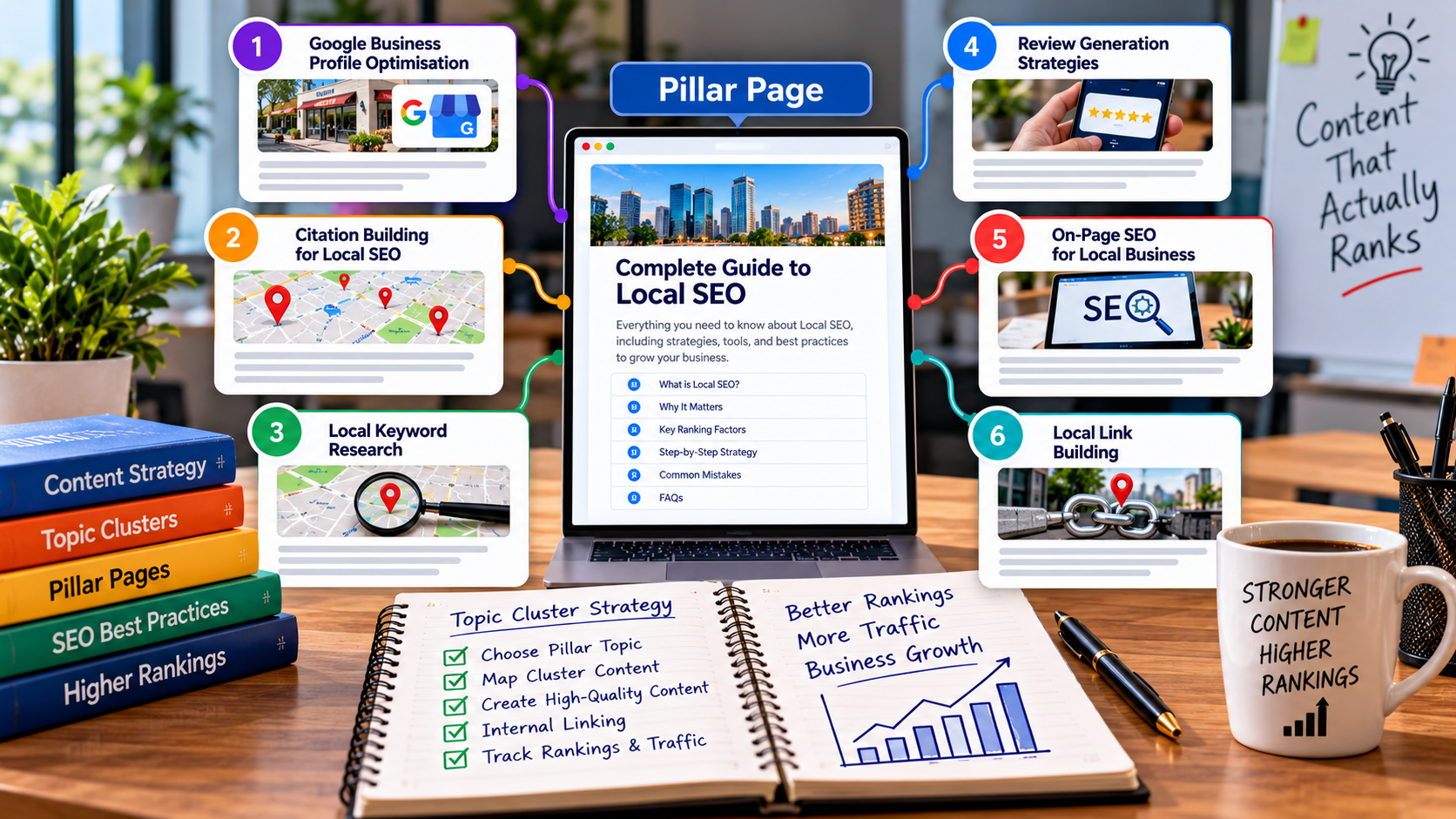
A pillar page is a comprehensive page that covers a broad topic at a high level, such as “Local SEO.” A cluster is a group of more specific pages, each covering one subtopic in depth, such as citation building, review generation, or service-area pages.
All cluster pages link up to the pillar, the pillar links out to each cluster page, and the cluster pages link to each other where relevant. The result is a tightly connected structure that helps both visitors and search engines understand how your content fits together.
Think of it like a textbook: the pillar is the table of contents and overview, and each cluster page is a detailed chapter.
Why This Structure Works
It builds topical authority
When Google sees many well-written pages covering different angles of one subject, all linked together, it has stronger reasons to trust your site on that topic. This is part of the broader quality signals discussed in Google’s guidance on helpful, people-first content.
It improves internal linking naturally
Internal links pass authority between pages and help crawlers discover content. A cluster structure makes strong linking a built-in outcome instead of an afterthought.
It matches how people actually search
Searchers move from broad questions to specific ones. A pillar catches the broad, early-stage query, while cluster pages catch the detailed ones, and links guide people from one to the other.
It helps in AI-driven search
Generative search tools favour sources that cover a topic clearly and consistently. A well-organised cluster makes it easier for those systems to understand and cite you. For more on this shift, read our guide to getting cited by AI Overviews, ChatGPT and Perplexity.
Step 1: Choose Pillar Topics That Match Your Business
Start with the core services or themes that drive revenue, not with whatever keyword has the most volume. A good pillar topic is:
- Broad enough to have at least 8 to 15 meaningful subtopics
- Directly tied to something you sell
- Realistic for your site to build authority in
For a digital marketing agency, pillars might be local SEO, link building, paid advertising, and web design. For a law firm, they might be family law, personal injury, and estate planning. For a manufacturer, they might be product categories and applications.
Pick three to five pillars to begin with. Trying to cover everything at once leads to thin, scattered content.
Step 2: Map the Cluster Topics
For each pillar, list the questions, problems, and comparisons your customers actually have. Good sources include:
- Search Console queries showing what you already appear for
- “People also ask” boxes and related searches in Google
- Sales and support questions your team hears repeatedly
- Competitor content, to find gaps rather than copy topics
- Forums and review sites where customers describe problems in their own words
Then sort ideas by search intent:
- Informational: how-tos, guides, explanations
- Commercial: comparisons, “best for” pages, cost guides
- Transactional: service and product pages ready to convert
A healthy cluster has all three. For example, within a local SEO pillar you might include citation building, hyper-local keyword research, Google Business Profile optimisation, and review generation, all feeding into the main local SEO guide for SMEs.
Step 3: Build a Strong Pillar Page
A pillar page should be the best single overview of the topic on your site. Aim for these qualities:
- Clear structure with descriptive headings and a table of contents
- Short, direct definitions near the top for featured snippets and AI summaries
- Brief summaries of each subtopic, each linking to its dedicated cluster page
- Visuals or tables where they clarify complex ideas
- A clear next step, such as a service page or enquiry form
The pillar should not try to say everything. Its job is to orient the reader and route them to the right depth. Length varies, but it is often longer than a typical blog post because it covers breadth.
Step 4: Write Cluster Content That Goes Deep
Each cluster page should target one specific topic and answer it completely. Avoid creating several pages that target the same query, because they will compete with each other.
For every cluster page:
- Answer the main question early, then expand
- Add real examples, numbers, or experience where you have them
- Link up to the pillar with natural, descriptive anchor text
- Link sideways to two or three related cluster pages
- Link to a relevant service page where a reader might take action
Step 5: Get Internal Linking Right
Internal linking is the glue of the whole system. Follow a few simple rules:
- Use descriptive anchor text that tells readers and search engines what they will find, not “click here”
- Link in context, inside the body of paragraphs where the reader would naturally want more detail
- Avoid over-linking: a handful of relevant links per section beats a page crowded with them
- Link both ways: pillar to cluster and cluster to pillar
- Update older posts to link to newer ones, since new content rarely gets links automatically
Keep a simple spreadsheet listing each pillar, its cluster pages, target keywords, URLs, and publish dates. It makes gaps and orphan pages easy to spot.
Step 6: Publish in a Sensible Order
You do not have to finish a cluster before publishing anything. A practical order is:
- Publish the pillar page first, or a solid draft of it
- Add the highest-value cluster pages that support your key services
- Update the pillar with links as each cluster page goes live
- Fill in the remaining subtopics over the following weeks and months
Consistency matters more than speed. A steady rhythm of useful content beats a burst of rushed posts.
Step 7: Measure and Improve
Track how the cluster performs as a group, not only page by page:
- Impressions and clicks for the cluster’s queries in Search Console. Our Google Search Console guide explains how to read this data.
- Ranking movement for the pillar and its supporting pages
- Internal link clicks and navigation paths in analytics
- Leads and conversions from pages in the cluster
Then improve. Add sections to underperforming pages, merge near-duplicates, and refresh outdated information. Our post on refreshing old blog posts covers this in detail.
Common Mistakes to Avoid
- Creating clusters without a business purpose, which attract traffic that never converts
- Writing near-identical cluster pages that cannibalise each other
- Forgetting the pillar-to-cluster links, leaving the pillar disconnected
- Using vague anchor text that wastes the value of each link
- Abandoning the cluster halfway, leaving gaps that weaken the whole structure
- Treating the pillar as a one-time project instead of updating it as the cluster grows
A Simple Example
Imagine an agency building a pillar on link building. The pillar introduces what link building is, why it matters, and the main approaches. Cluster pages might cover the link wheel, the link pyramid, outreach methods, and how to evaluate link quality. Each links up to the pillar and across to the others, and the pillar points to the agency’s link building services. That is a cluster doing its job.
Final Thoughts
Topic clusters and pillar pages turn a pile of blog posts into a structured body of knowledge. They make your site easier to understand, easier to navigate, and easier to trust, for both people and search engines. Start small with one pillar tied to a real service, build outward, and keep everything connected.
If you want help planning a content structure that supports your goals, our SEO team can map it with you, or you can request a free audit to see where your current content stands.
