
Here’s a common story. A business publishes a solid blog post. It climbs the rankings, brings steady traffic, and then, slowly, it slips. Nothing dramatic happened. The post simply aged: statistics went stale, competitors published fresher content, and the search landscape moved on.
This is called content decay, and it affects almost every site that has been publishing for more than a year. The good news is that fixing it is usually faster and cheaper than writing something new. A well-planned refresh can lift an old post back to the first page with a fraction of the effort.
This guide shows you how to find the right posts, update them properly, and avoid the mistakes that waste the work.
Why Refreshing Beats Starting from Scratch
Old posts already have things new content lacks:
- Existing URLs with history, including links and indexing
- Proven relevance for at least some queries
- Internal links pointing to them from other pages
Updating a page builds on that foundation. Publishing a brand-new article means starting at zero. For many sites, refreshing the right ten posts delivers more traffic than publishing ten new ones.
It also supports quality signals. Google’s guidance on helpful content emphasises accurate, up-to-date, people-first information, which is exactly what a refresh delivers. And for AI-driven search, clear, current, well-sourced pages are more likely to be cited, as we explain in our piece on getting cited by AI Overviews, ChatGPT and Perplexity.
Step 1: Find Posts Worth Refreshing
Not every old post deserves attention. Use Google Search Console and your analytics to build a shortlist. Look for:
- Posts with falling clicks over the last six to twelve months
- Pages stuck on positions 8 to 20, which are close to page one
- High impressions but low CTR, suggesting the title or description needs work
- Posts that still bring conversions but are losing visibility
- Evergreen topics with consistent search demand
Compare the same period year over year so seasonality does not fool you. A post about holiday cleaning will naturally dip in summer, and that is not decay.
Rank candidates by potential: how much traffic or revenue could come back if the page recovered? Start with the top five to ten.
Step 2: Decide What Each Post Needs
Not all refreshes are equal. Sort each candidate into one of four actions:
- Update: the topic is still relevant, the structure is sound, but details are outdated
- Rewrite: the topic matters, but the content no longer matches what searchers want
- Merge: two or more posts overlap and compete with each other
- Retire: the topic is obsolete or off-brand, so redirect it to the closest relevant page
Be honest. Pruning thin or duplicate content often helps the stronger pages perform better.
Step 3: Re-Check Search Intent
Before editing a word, search your target keyword and look at what ranks now. Ask:
- What type of content is on page one: guides, lists, tools, product pages, videos?
- What angle do the top results take?
- Which questions do they answer that you do not?
- Is there an AI Overview or featured snippet, and what does it cover?
Search intent shifts over time. A post written as a how-to may now face results dominated by comparison pages. If your format no longer matches, adjust it. Matching intent matters more than adding words.
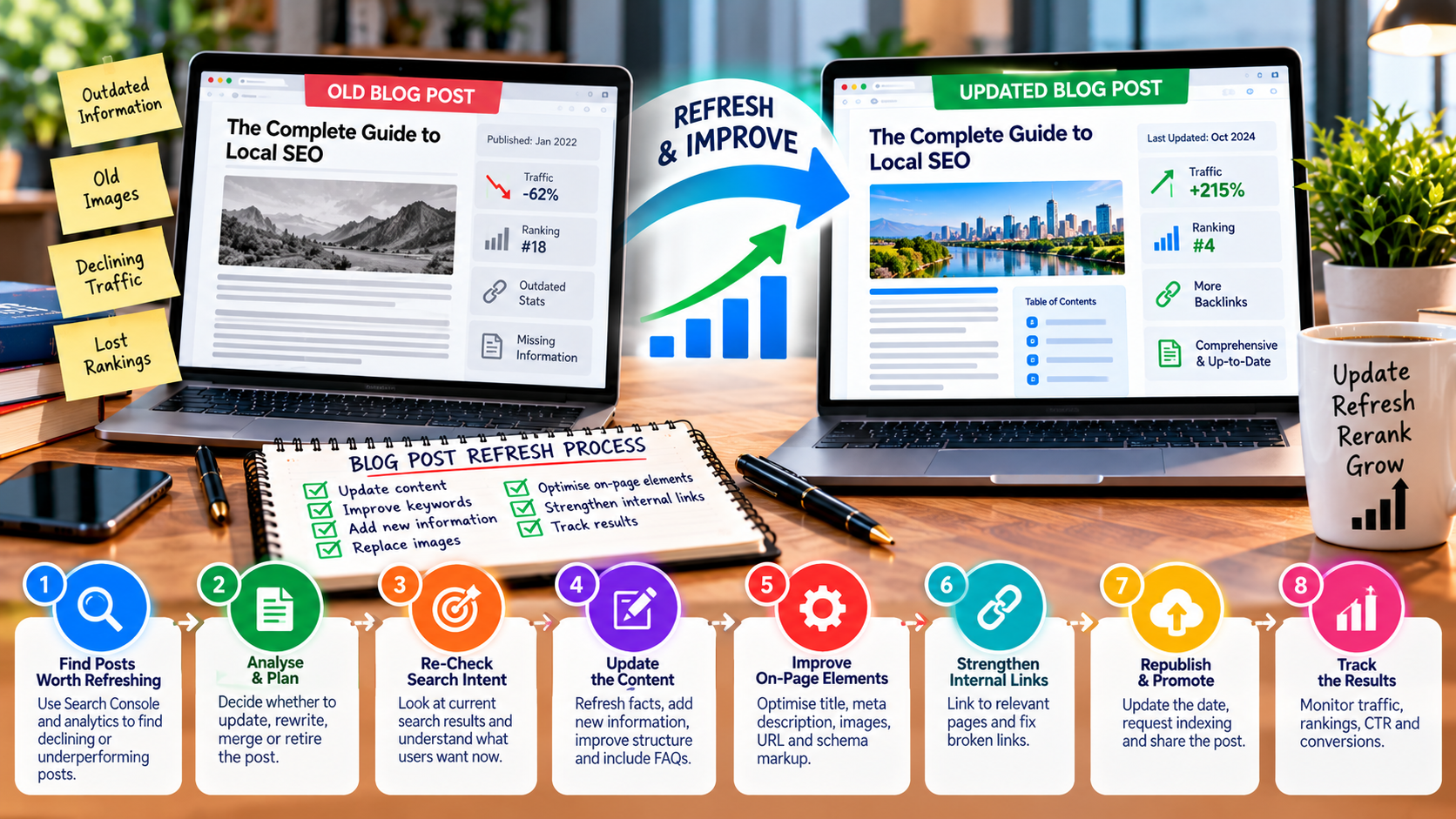
Step 4: Update the Content Itself
Now do the real work. A thorough refresh usually includes:
Facts and examples
Replace outdated statistics, dates, screenshots, tool names, prices, and regulations. If you cannot verify a number, remove it rather than leave it. Cite reliable sources and link to primary information where appropriate.
Structure and clarity
- Put a short direct answer near the top
- Break long paragraphs into scannable sections
- Add clear H2 and H3 headings that reflect real questions
- Include a FAQ section answering follow-up questions concisely, which also helps with snippets and AI summaries
Depth
Add what the page is missing: new sections, practical steps, examples from real work, comparison tables, or expert commentary. Strengthen experience and expertise signals with a visible author, credentials, and first-hand insight. Our guide to Google’s E-E-A-T and AI content goes deeper on this.
Cut the fluff
Remove filler intros, repeated points, and sections that no longer serve the reader. Shorter and better is perfectly fine.
Step 5: Improve On-Page Elements
Small details often drive the quickest gains:
- Title tag: include the main keyword naturally and a clear reason to click. Avoid stuffing a year into the title unless the content truly changes each year.
- Meta description: write a concise summary that sets accurate expectations
- URL: keep the existing URL unless there is a strong reason to change it. If you must change it, set up a 301 redirect.
- Images: compress them, write descriptive alt text, and replace outdated visuals
- Schema markup: add or update FAQ and article markup where it fits
Check speed too. Heavy images and scripts accumulate over time, so review the page against our guide on Core Web Vitals and page speed.
Step 6: Strengthen Internal and External Links
An old post is a chance to fix its connections:
- Add internal links to newer, relevant content and to related service pages. Use descriptive anchor text, as covered in our guide to topic clusters and pillar pages.
- Update older posts that should link to this one, because they pass authority and help readers find it
- Fix broken links and replace dead sources
- Link out to one or two credible references where it genuinely helps the reader
Step 7: Republish and Tell Search Engines
Once the update is complete:
- Update the visible “last updated” date, but only if the changes are substantial. Changing dates without real edits can erode trust.
- Keep the original publish date if your template supports showing both
- Request indexing in Search Console using the URL Inspection tool
- Resubmit your sitemap if you made many changes
- Share the refreshed post through email, social channels, and any relevant communities to generate fresh engagement
Promotion is often skipped, but a refreshed post can earn new links and shares just like a new one.
Step 8: Track the Results
Give changes time. Many refreshed posts show movement within a few weeks, though competitive terms can take a couple of months. Track:
- Clicks, impressions, CTR, and average position for the page
- Rankings for the primary and secondary keywords
- Conversions or leads attributed to the page
- Changes in AI-driven referrals or brand mentions, where measurable
Keep a simple log with the date, what you changed, and the results. Over time, it shows which types of updates work best for your site.
A Practical Refresh Checklist
- Confirm search intent against current results
- Verify and replace outdated facts
- Add a direct answer near the top
- Fill content gaps and add real experience
- Improve headings, formatting, and FAQs
- Rewrite title and meta description if needed
- Compress images and update alt text
- Add internal links to new content and key service pages
- Fix broken links
- Update schema where appropriate
- Request indexing and promote the post
Mistakes to Avoid
- Changing only the date without improving the content
- Changing the URL unnecessarily, which risks losing accumulated value
- Refreshing everything at once, instead of prioritising high-potential pages
- Adding length for its own sake, which dilutes clarity
- Ignoring intent changes, so the page remains mismatched to what searchers want
- Forgetting to measure, which leaves you guessing about what worked
Final Thoughts
A content refresh is one of the highest-return activities in SEO because it builds on assets you already own. A regular schedule, even a couple of posts each month, keeps your best content current and competitive while you continue publishing new material.
If you would like help identifying which of your posts deserve a refresh and what to change, our SEO services team can run a content audit, or you can start with a free SEO audit report.
